Meet UE Conduit: Your AI Agent, Sitting at the Unreal Editor

Your AI agent, at the Unreal Editor
UE Conduit gives your agent 568 tools inside Unreal Engine 5.8, so it can build, play and check your game like it is sitting at the computer with you.
We have been building something for a while, and it is finally ready for everyone else. UE Conduit connects your AI agent to Unreal Engine 5.8. We built it at Jag Journey for our own game first, and it is out in the world now for game developers and studios working in Unreal.
The short version: you tell your agent what you want, and the change happens in the editor you have open. No copying prompts between windows. No pasting code into a chat and hoping for the best. Your agent works like it is sitting at the computer with you, and it never asks to borrow your chair.
What your agent can actually do #
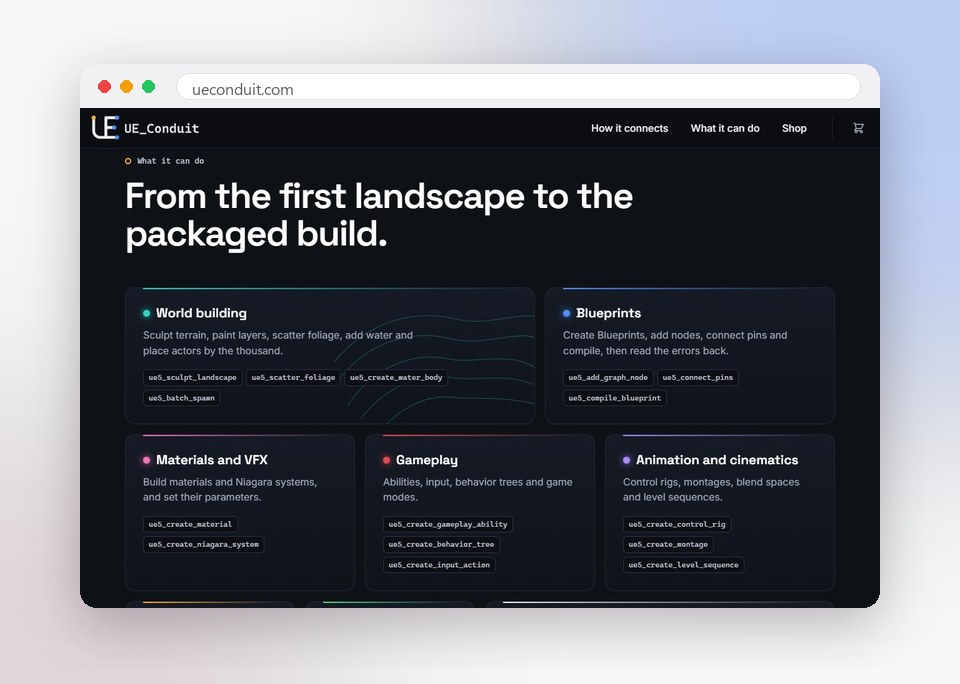
UE Conduit gives your agent 568 tools across 89 categories. The website names a handful of them. The rest are there too, and together they cover the job from the first landscape to the packaged build:
World building: sculpt terrain, paint layers, scatter foliage, add water and place actors by the thousand.
Blueprints: create them, add nodes, connect pins, compile and read the errors back.
Materials, VFX and audio: build materials, Niagara systems and MetaSounds, and set their parameters.
Gameplay: set up abilities, input, behavior trees and game modes.
Animation and interface: work with control rigs, montages, blend spaces, level sequences, widgets and HUDs.
Build and ship: compile, cook and package, with a build, test and fix loop that reads its own errors and tries again.
What working with it looks like #
Say you tell your agent, "Place 20 enemies on the beach, then make sure the game still runs." Your agent calls the tools, the enemies land in the level you have open, and it compiles, starts Play and reads back what happened. If something fails, it sees the error and goes after it, instead of asking you to copy and paste it into a chat.
You stay in charge of the game. Your agent handles the clicking, the wiring and the checking, the same way a teammate would if they pulled up a chair beside you.
How far ahead is it? #
We looked hard at what else is out there for Unreal Engine, because you should too. Many of the connectors we reviewed in November 2026 list a few dozen to a couple hundred commands. UE Conduit lists 568 tools, which is more than most of what we found.
Tool counts are not measured the same way everywhere, though, so here is the better question to ask of any of them: after your agent makes a change, can it tell whether the change worked?
It checks its own work #
Anyone who has worked with an AI agent knows the cheerful "all done!" that turns out to mean "I removed the floor." UE Conduit is built so your agent can see what it did and prove it:
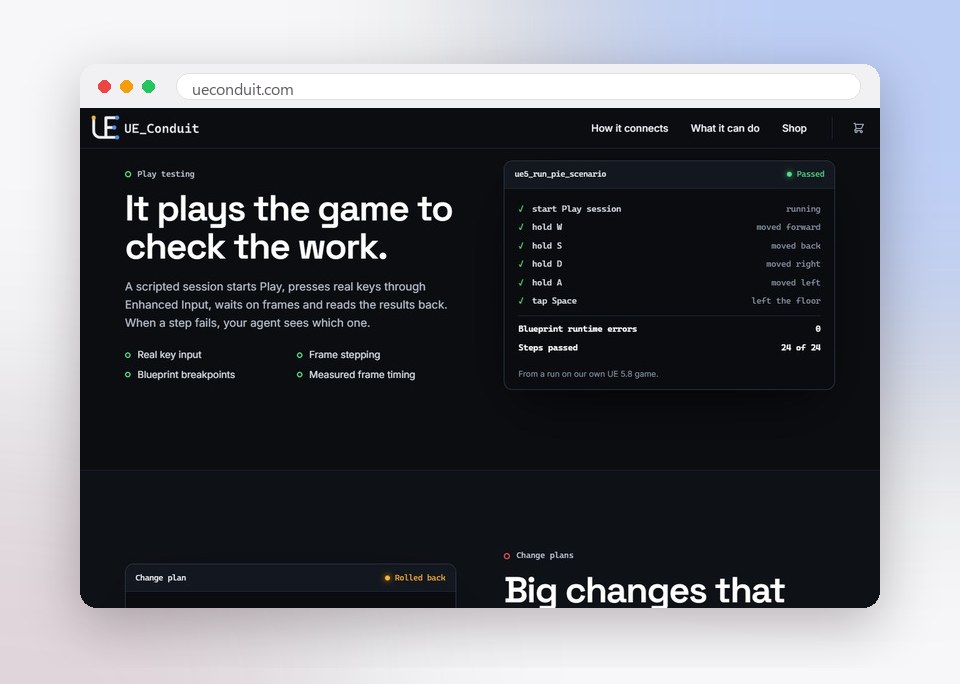
It plays the game. A scripted session starts Play, presses real keys through Enhanced Input, waits on frames and reads the results back. When a step fails, your agent sees which one.
It sees the editor. It can capture any window, dock tab, asset editor or viewport, then compare images pixel by pixel.
It reads the build. Compile results, the output log and Play state all come back to your agent.
It validates the work. Blueprint, widget, animation, material, Niagara, sound and PCG checks all share one output shape.
It can take big changes back. Your agent lists its actor changes as one plan. If a step fails, UE Conduit rolls the plan back and proves the world came back.
Built for our own game first
UE Conduit runs on our own Unreal Engine 5.8 MMO today. Its last full run passed 951 live checks with 0 failures.
Bring the AI you already use #
UE Conduit works with Claude Code, Claude Desktop and any client that speaks the Model Context Protocol. The panel inside the editor works with six providers, including OpenAI, Grok, Gemini and Ollama, plus your own custom endpoint.
Your agent keeps its context in its own client, so an editor crash does not lose the work. The plugin itself is C++ with no third-party dependencies, and it runs each command through Unreal's own editor APIs. Access comes in three levels, read, scene and destructive, so you decide how much your agent can change.
One honest limit: today it runs on Unreal Engine 5.8 on 64-bit Windows.
Go see it #
Read more on our UE Conduit product page, then see the pricing and get it at ueconduit.com. Tell your agent what you want, and let it pull up a chair.
Jag Journey, LLC
The team behind Swift Warning, VoVo and the rest of the Jag Journey family of apps.
Related Posts

What AI Agents Are and How Much Access to Give Them
AI agents do more than answer questions. They can browse websites, fill in forms, send messages and change files. Here is how they work and how to decide what to let them touch.

Should Your Business Use an AI Chatbot for Customer Questions?
An AI chatbot can answer routine questions at midnight, or confidently give a customer the wrong refund policy. Here is how to decide if one fits your business and how to set it up responsibly.

How AI Chatbots Work, Explained Without the Jargon
AI chatbots can feel like magic or like a search engine, but they are neither. Here is a plain-English explanation of how they learn, how they answer, and why that matters for trusting what they say.

Using AI-Generated Images in Your Business: Rights, Disclosure and Quality
AI image tools can produce a blog header or social graphic in seconds. Before you use one commercially, understand the ownership questions, the rules of the tool, and the checks that keep you honest.

How to Write an AI Use Policy for a Small Team
Your team is probably already using AI tools. A short, clear policy helps them do it well: which tools are approved, what information stays out, when a human must review, and when to disclose.
Comments (0)
Sign in or sign up to comment.
No comments yet. Be the first to share your thoughts!