How to Write Alt Text That Actually Helps
Alt text, short for alternative text, is a written description attached to an image. Screen readers read it aloud to people who are blind or have low vision. Browsers display it if an image fails to load. Search engines use it to understand images.
Many sites either leave it blank or fill it with something unhelpful like "IMG_4521" or a string of keywords. Writing good alt text is a small habit that makes a real difference. Here is how.
Start with purpose, not pixels #
The key question is not "What does this image look like?" but "Why is this image here, and what would someone miss without it?" The same photo might need different alt text on different pages.
Imagine a photo of volunteers packing food boxes:
- On a page about your food pantry's volunteer program: "Volunteers of all ages packing boxes of canned goods at the community pantry."
- On a page announcing a record month: "Volunteers surrounded by stacks of packed food boxes ready for delivery."
Describe what matters in that context.
Alt text by image type #
Informative images #
Photos and illustrations that add information need a concise description of the relevant content. One clear sentence is often enough.
Functional images #
When an image is a link or a button, describe the action or destination, not the picture.
- A linked logo in the header: your organization's name, or "Home."
- A magnifying glass icon on a search button: "Search."
- A printer icon that prints the page: "Print this page."
Decorative images #
Images that are purely visual, like background flourishes or a divider line, should have empty alt text so screen readers skip them. Many content management systems offer a "decorative" checkbox. Leaving the alt attribute empty is different from leaving it missing; a missing alt may cause screen readers to read the file name.
Images of text #
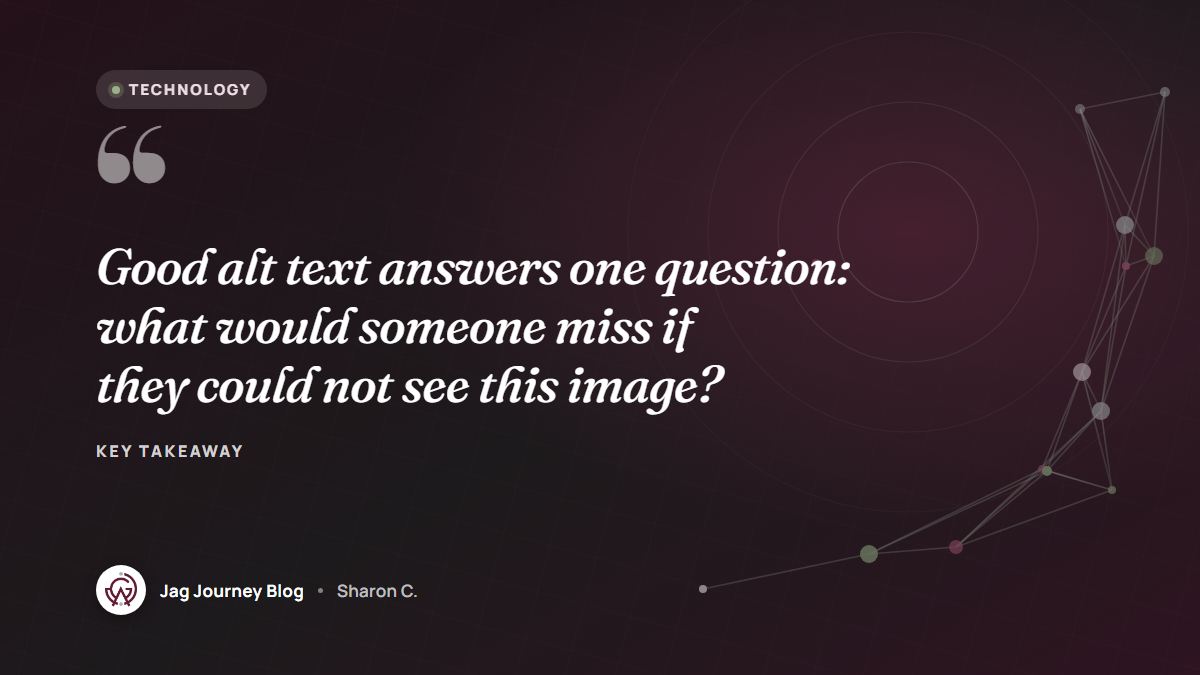
If an image contains words, such as a quote graphic or event flyer, the alt text should include those words. Better still, put important text in the page itself, where it can be resized and read reliably.
Charts and graphs #
Give a short alt text that states the main point, such as "Bar chart showing volunteer hours rising each quarter this year," and provide the details in nearby text or a simple data list so everyone can access the numbers.
Complex images #
Maps, diagrams and infographics may need more than a sentence. Use short alt text to identify the image and provide a fuller description in the surrounding content.
Logos and headshots #
For a partner's logo, the organization's name is usually enough. For a staff photo, the person's name, if it is not already in a caption right next to the image.
Writing tips #
- Keep it concise. Aim for the essential information, usually a sentence or less.
- Skip "image of" or "picture of." Screen readers already announce that it is an image. Do say "illustration," "screenshot" or "painting" if the format matters.
- Put the most important information first.
- Do not repeat a caption word for word. If a caption already describes the image, keep the alt text brief or complementary.
- Avoid keyword stuffing. Write for people. A natural description serves search engines well too.
- Match the tone of your content.
Reviewing AI-generated alt text #
Many tools now suggest alt text automatically. These suggestions can be a helpful start, but they often describe what an image looks like rather than why it matters, and sometimes they get details wrong. Review and edit every suggestion before publishing, the same way you would check any AI output, as described in our guide to fact-checking AI-written content.
Build it into your workflow #
The easiest time to write alt text is when you upload an image. Make it part of your publishing checklist, and spend a little time adding alt text to images on your most visited pages. It is one of the most meaningful items on any website accessibility checklist.
Frequently asked questions #
How long should alt text be? #
Usually a short sentence or phrase is enough. If an image needs a longer explanation, such as a detailed chart, provide the details in nearby text instead of a very long alt text.
Should I include keywords in alt text? #
Only if they naturally describe the image. Alt text exists to help people understand the image, and accurate descriptions also help search engines.
Does every image need alt text? #
Every image needs an alt attribute, but decorative images should have it left empty so screen readers skip them. Informative and functional images need meaningful descriptions.
Related Posts
Color Contrast and Readable Text: Simple Rules for Accessible Design
Light gray text on a white background might look elegant, but many people cannot read it. Learn the contrast ratios that matter, how to check your colors and the type choices that make text comfortable.
Cookie Banners and Consent: What Website Owners Should Understand
Cookie banners are everywhere, and many are confusing or misleading. Learn what cookies actually do, when consent may be required, and how to design a banner that is honest and easy to use.
AI Crawlers and robots.txt: Deciding What Bots Can Read
AI companies send crawlers to read websites for training, search and on-demand answers. Learn how these bots differ, what robots.txt can and cannot control, and how to decide what is right for your site.
How to Choose and Register a Domain Name You Will Not Regret
Your domain name is your address online for years to come. Learn how to choose one people can remember and spell, register it so your organization truly owns it, and keep it from expiring.
What a Church or Nonprofit Website Needs on Day One
Visitors to a church or nonprofit website usually want a few simple answers fast. Here are the essentials to put first, from service times and location to giving, volunteering and accessibility.
Comments (0)
Sign in or sign up to comment.
No comments yet. Be the first to share your thoughts!